WhatsApp appointment booking, paid and confirmed in the chat
Customers pick a service, a team member and a time inside WhatsApp, pay in full or a deposit, and get reminders automatically. No app to download and no back-and-forth messages.
- 7-day free trial
- No credit card required
Trusted by businesses worldwide













































Booking automation that turns WhatsApp messages into paid bookings
Bookings at any hour
Customers book in the app they already use, at 11 pm or on a Sunday, without waiting for your front desk to reply. Your team starts the day with a full calendar instead of a full inbox.
Paid before they arrive
Ask for full payment or a deposit right in the chat. The slot is held while the customer pays and the booking is confirmed the moment the payment goes through.
Fewer no-shows, less admin
Confirmations and reminders go out on their own, customers confirm with one tap, and changes happen in WhatsApp instead of on the phone.
How WhatsApp appointment booking works
From the first message to a confirmed, paid appointment in about a minute, with no manual scheduling.
- 1
They message you
From a WhatsApp link or QR code, a Click-to-WhatsApp ad, your website or your Google Business Profile.
- 2
Pick a service
Choose a service and an option, such as 60 or 90 minutes, with prices, sale prices and add-ons shown.
- 3
Choose staff and time
Only real free times appear, for the chosen team member or anyone available, in the customer's timezone.
- 4
Pay in the chat
Pay in full or a deposit through your payment gateway, or use a package credit. The slot is held while they pay.
- 5
Confirmed and reminded
An instant confirmation, a reminder before the visit, and the booking on your team's calendar.
Key features of the WhatsApp booking system
Everything your WhatsApp appointment scheduling needs, from service options to deposits.
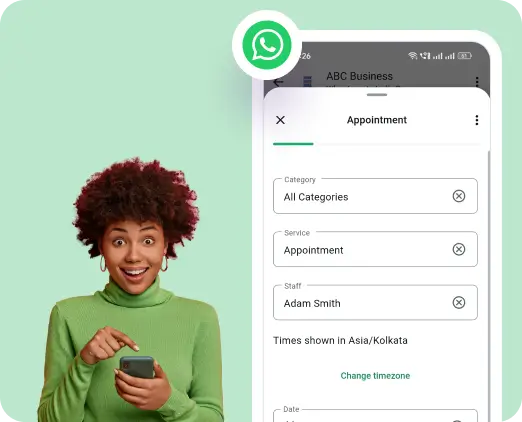
Services, options and add-ons in a WhatsApp form
Customers book through a WhatsApp Flow, a booking form that opens inside the chat. They choose a category, a service and an option with its own length and price (up to 20 per service), then add-ons, their details and a coupon if you run one.
- Sale prices shown struck through
- Peak pricing for weekends, holidays or after hours
- Booking fields you choose: email, date of birth, address, notes and more

Staff schedules and live availability
Every team member has their own working hours, breaks, days off, locations and services. The bot offers only the times when the right person is free, and customers can pick someone by name or take whoever is available.
Each time is locked while it is being booked, so two customers can never take the same slot. Team members can also have their own price for the same service.

Payment at booking: full or deposit
Turn on online payment for a service and choose full payment or a deposit, as a fixed amount or a percentage of the total. The customer gets a Pay button in WhatsApp, the slot is held while they pay, and the booking is confirmed as soon as the payment succeeds. The balance stays on the invoice, to collect at the visit or with a payment link. More on booking with online payment.
- Stripe: card payments worldwide
- Razorpay: UPI, cards and netbanking in India
- MyFatoorah and PayTabs: the Gulf and the Middle East
- Thawani: Oman, and DOKU: Indonesia
- Package and membership credits are used before any payment is asked for

Confirmations and reminders on WhatsApp
Send a confirmation when someone books, a reminder the day before and any follow-up you like, as WhatsApp templates, SMS or email. Automation rules let you set the timing, from minutes to weeks before or after the appointment, and a one-tap link lets customers confirm they are coming. Start from our free appointment reminder templates, or see everything in WhatsApp appointment reminders.
Your team is told about new, moved and cancelled bookings too, by app notification, email or WhatsApp.

Reschedule and cancel without a phone call
With the AI booking agent, customers move a booking in their own words, such as "can I come Friday after 5?", and get the new times right in the chat. The booking menu lets them view upcoming appointments and cancel before your cancellation deadline, and reminders can carry reschedule and cancel links.
If the new time costs more, they pay the difference first. If it costs less, the difference is credited to their account.
Watch the WhatsApp appointment bot take a booking
A 7-minute walkthrough: set up the WhatsApp Flow booking bot and book an appointment from a customer's phone.

Booking form, AI agent or booking link: which WhatsApp booking bot fits?
There are three ways to take bookings in WhatsApp with Whautomate, and many businesses use more than one. A booking menu with a WhatsApp Flow suits customers who like to tap through a short form. An AI booking agent suits customers who write in full sentences or ask questions before they book. A booking link opens your online booking page from any chat, on any channel.
| Menu and WhatsApp Flow | AI booking agent | Booking link | |
|---|---|---|---|
| How customers book | Tap through a form inside the chat | Write in their own words | Open your booking page |
| Service options and staff choice | Yes | Yes | Yes |
| Add-ons and coupons | Yes | No | Yes |
| Payment or deposit | Yes | Yes, when turned on | Yes |
| Reschedule | By link | In the chat on WhatsApp | Yes |
| Cancel | In the chat | In the chat on WhatsApp | Yes |
| Channels | WhatsApp; new bookings on Instagram, Messenger, Telegram and TikTok | Any channel | |
| Set up with | A ready-made template | A ready-made template and your own AI provider key | A link per service, category or team member |
Whichever you choose, it is one WhatsApp booking system: every booking lands in the same calendar with the same rules for availability, payment and reminders. Our guide to how WhatsApp booking bots work goes deeper into each type.
Why the WhatsApp Business app is not enough
The free WhatsApp Business app has quick replies and a catalogue, but it cannot show live availability, take payment or send reminders on its own, so every booking is still typed by hand. Booking bots need the WhatsApp Business API. You connect your number with Facebook in about ten minutes, and where Meta allows it, you can keep using the Business app on the same number.
Above: a 5-minute demo of the AI booking agent taking appointments on WhatsApp.
See WhatsApp booking in your industry
Short demos of the booking bot for clinics, salons, studios and multi-location businesses.
What WhatsApp appointment booking costs
Two costs add up: your Whautomate plan and Meta's charge for each WhatsApp message.
Your Whautomate plan
Booking is part of the Bookings module, which comes with CRM Suite because bookings need your client list. The Complete plan includes both and starts at US$149 a month, with local prices on the pricing page. Every plan starts with a 7-day free trial, no credit card required.
Meta's WhatsApp charges
Meta charges per message. Replies you send while a customer is chatting with you, which covers the booking conversation itself, are service messages: the first 1,000 per number each month are free, and after that each one costs the same as a utility message. Confirmations and reminders sent as templates are utility messages. If you send a confirmation and two reminders for every booking, Meta's charge per booking is:
| Customer's country | Utility rate (USD) | 3 messages per booking |
|---|---|---|
| India | 0.0014 | about US$0.004 |
| United States | 0.0034 | about US$0.01 |
| Brazil | 0.0068 | about US$0.02 |
| United Arab Emirates | 0.0157 | about US$0.05 |
| Singapore | 0.0160 | about US$0.05 |
| United Kingdom | 0.0220 | about US$0.07 |
These are Meta's list rates from 1 October 2026, before volume discounts. See what changed in WhatsApp pricing or look up any country on our WhatsApp API pricing page.
Everything else a booking business needs
Several locations
Customers choose a location first, and each location keeps its own team, hours, services and holidays.
Classes and events
Group classes and events book in WhatsApp too, with capacity limits and waitlists. See class bookings.
Packages and memberships
Session packs and membership credits are used automatically. You can also take bookings only from existing clients or clients with credits.
Hand over to your team
"Talk to our staff" or the AI agent passes the chat to your team inbox with the full history.
Beyond WhatsApp
The AI booking agent also takes new bookings on Instagram, Messenger, TikTok and Telegram, where customers can also book in a mini app.
Calendar feeds
Subscribe to any team member's or location's bookings in Google Calendar, Outlook or Apple Calendar, updated automatically.
Built for businesses that run on appointments
Clinics and healthcare
Patient bookings, intake details, reminders and follow-ups on WhatsApp.
Dental clinics
Check-ups, treatments and recall reminders booked in the chat.
Aesthetic clinics
Consultations and treatments with deposits taken at booking.
Salons, beauty and spas
Stylist choice, service options and add-ons in one booking.
Fitness and wellness
Personal training, classes and packages on WhatsApp.
Diagnostic labs
Test bookings, reminders and follow-ups in WhatsApp.
Works well with
Online booking on every channel
The same calendar behind your booking page, chatbots and team dashboard.
Appointment reminder templates
Free WhatsApp reminder templates, ready for Meta approval.
Free booking page generator
Make a simple WhatsApp booking page in minutes, no account needed.
Frequently asked questions
What is a WhatsApp appointment bot?
A WhatsApp appointment bot is a booking system that runs inside WhatsApp. It shows your services and free times, takes the booking and any payment, and sends confirmations and reminders, so appointment scheduling happens without anyone typing replies. With Whautomate, booking in WhatsApp runs through a WhatsApp Flow booking form, an AI booking agent, or both.
Can customers book appointments directly in WhatsApp?
Yes. Customers pick a service, a team member, a date and a time inside the chat and get a confirmation straight away, with no app to download and no website to visit. The booking goes into your calendar like any other appointment.
Is WhatsApp appointment booking free?
The WhatsApp Business app is free, but every booking has to be handled by hand (see does WhatsApp Business have a booking system?). Automated booking needs the WhatsApp Business API and a booking system: with Whautomate that is the Complete plan from US$149 a month, plus Meta's per-message charges, which come to around a cent per booking in many countries. See pricing.
Do I need the WhatsApp Business API?
Yes. Booking bots, WhatsApp Flows and automated reminders only work through the WhatsApp Business API. You connect your number with Facebook in about ten minutes, and where Meta allows it you can keep using the WhatsApp Business app on the same number.
Can I take a deposit or full payment when someone books?
Yes. Set each service to full payment or a deposit (a fixed amount or a percentage). The customer pays through Stripe, Razorpay, MyFatoorah, PayTabs, Thawani or DOKU, the slot is held while they pay, and the balance stays on the invoice.
Can customers choose a specific staff member?
Yes. Customers can pick a team member by name or choose anyone available, and only that person's free times are shown. You can also turn staff choice off.
Can customers reschedule or cancel on WhatsApp?
Yes. On WhatsApp, the AI booking agent reschedules and cancels in the chat. With the booking menu, customers cancel from "My bookings" before your cancellation deadline and reschedule with the link in their confirmation or reminder.
Does it sync with Google Calendar?
Bookings appear in Google Calendar, Outlook or Apple Calendar through a calendar feed for each team member or location, updated automatically. The feed is one-way: availability comes from the working hours you set in Whautomate.
Can the booking bot speak my customers' language?
Yes. Every label and message in the WhatsApp booking flow can be edited, so you can run it in your customers' language, and the AI agent replies in the language the customer writes in. The online booking page is available in eight languages.
Does it work for businesses with several locations?
Yes. The multi-location booking flow asks customers to choose a location first, then shows that location's services, team and times.
What our customers say
We’ve been using Whautomate for the past few months and it has been an exceptional tool for automating our WhatsApp replies. It has significantly improved our customer service efficiency, saving us valuable time. We also want to highlight the service provided by Babu, the founder, who has consistently been responsive and helpful. We wholeheartedly recommend Whautomate for anyone seeking effective automated solutions.
 Natalie Hiong
Founder, Creative Hearts
We were lucky to find Whautomate when we were looking for a razorpay integrated appointment scheduling software. Whautomate has helped us organize our client calendar effectively and send out professional communication to clients on WhatsApp. The team is responsive and customer support is great. I would highly recommend them.
 Chaitra
Founder, Untangle
Whautomate took the admin chaos out of running my Pilates studio, scheduling is effortless and client communication finally feels seamless. Highly recommend!
 Meryem
Founder, Reforma Pilates
Whautomate has helped me to reduce man hours with its automatic reminders after booking of appointments. With the appointment page, I can easily see the agenda for the day and it has the ability to sync to my Google calendar which is very useful.
 Justin
General Manager, Espressivo Music Academy
I highly recommend Whautomate for their exceptional WhatsApp automation solution. Their team's expertise and dedication impressed me from start to finish. They seamlessly integrated their solution, improving our customer service and productivity. Trust them for reliable and effective WhatsApp automation that drives business growth.
 Raghavendran Rajasekaran
Founder, Music Love Yoga
This platform has truly revolutionized the way I run my clinic. Managing Appointments, Billing, and Patient Records has become so effortless, and the WhatsApp automations are a real game-changer. The support team is fantastic, always there to lend a helping hand whenever I need it. If you're looking to take your clinic to the next level, I wholeheartedly recommend Whautomate!
 Aazam
Founder, Sport-fit Physio Care
Honestly, I was a bit skeptical at first about Whautomate, but the team has been incredibly friendly, responsive, and diligent. While many other apps have their pros and cons, if you're looking for fast, reliable tech support that makes your life easier, Whautomate is the way to go. The best tech support and customer service, highly recommended!
 Dr. Giri Prasetya
Founder, Spinalign Wellness
After using Whautomate for over a year, I can confidently say it has transformed the way I run my clinic. Appointment scheduling and follow-ups, which was one of the most time-consuming parts of our workflow is now fully streamlined. The WhatsApp integrations are incredibly effective, helping our patients stay engaged, informed, and consistent with their visits.
What sets Whautomate apart is not just the automation, but the team behind it. Their support is unbelievably fast, attentive, and solution-oriented, Especially Mr. Parthiban, He is Gem, Progressive and Positive Thinker, He is Kind and attentive. Any time we needed help, he responded with clarity and efficiency something we’ve rarely experienced with other software providers or any other service providers.
 Dr. Abdul Azeez
Founder, Pearl Kinesis Healthcare
My overall experience with Whautomate has been positive and helpful for my business. I had researched extensively for platforms that would cater to my specific needs, were quick to install and did not require heavy investments. Whautomate met all my requirements. The team is also great to work with and the CEO was personally involved in critical requirements.
 Lakshmi
CEO, SAMA: The Calm Mind Studio
Using Whautomate for managing my yoga and sound healing classes has made the entire booking process smooth and effortless. From class scheduling to tracking credits and communication, everything feels well organised and easy to use for both me and my students. Grateful for the support and simplicity your platform brings to small wellness businesses like mine. Thank you, Whautomate team, for creating such a helpful system!
Founder, The Unalome
Start your 7-day free trial
Boost your sales and save countless hours with Whautomate.
- 7-day free trial
- No credit card required
- Cancel anytime