WhatsApp Drip Campaigns: 12 Ready-to-Use Sequences, Costs and Meta Rules
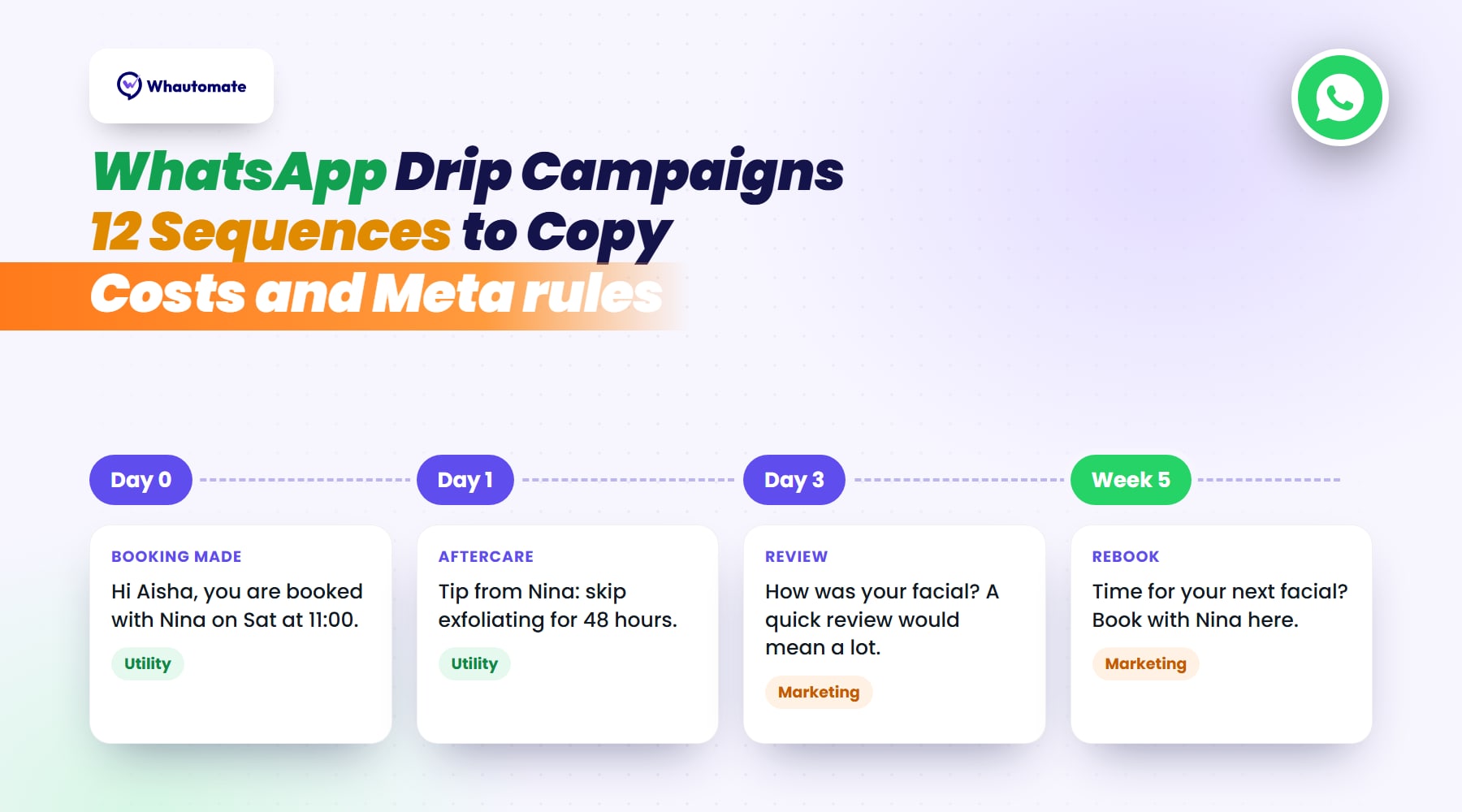
A WhatsApp drip campaign sends a short series of messages to one person, at set times, after something they did: they enquired, booked, bought, or went quiet. Done well, it does the follow-up your team means to do but rarely has time for. Done badly, it gets your number blocked.
This guide gives you 12 sequences you can copy, with the message text, timing and Meta template category for every step, and the 2026 rules and costs that decide whether a drip works. Most examples are for businesses that run on bookings, such as salons, practices, studios and tutors, because that is where drips pay for themselves fastest.
What is a WhatsApp drip campaign?
A drip has four parts:
- A trigger: what starts it, such as a new enquiry, a first booking, a missed appointment or a recall date.
- Steps: the messages, each with a delay, for example “1 day after the appointment”.
- A goal: what you want the person to do, usually book, rebook or pay.
- An exit: when it stops. That is when they reach the goal, reply, or opt out.
Here is what one looks like as an automation rule in Whautomate: an aftercare, review and rebooking sequence that starts when an appointment is completed.
{{client.firstName|there}}, a tip from {{appointment.practitioner}}..."{{appointment.service}}?"| Drip campaign | Broadcast | One-off follow-up | |
|---|---|---|---|
| Who gets it | One person at a time, when they trigger it | A whole list at once | One person |
| Timing | Relative to their action | One date and time | Once |
| Best for | Onboarding, rebooking, win-back, payments | Announcements, launches | A single reminder |
| Stops when | They reach the goal or opt out | Never: it is one send | Not needed |
Why drips need the WhatsApp Business API
The free WhatsApp Business app can send a greeting, an away message and manual broadcasts to people who saved your number. It cannot send a message “3 days after the appointment” to each person automatically. Drips need the WhatsApp Business API and an automation platform. With Meta’s coexistence option you can usually keep using the Business app on the same number.
Meta’s rules for drip campaigns in 2026
1. Templates outside the 24-hour window. When a customer messages you, a 24-hour customer service window opens, and you can reply freely. Most drip steps go out days later, so each one must be a message template that Meta has approved (pricing and windows).
2. The template category sets the price and the rules. Meta classes each template as marketing, utility or authentication. A message about a specific booking or payment, with no promotion, can be utility. Anything promotional, including “come back for 10% off”, is marketing. A template that mixes both is treated as marketing, and Meta can recategorise a template it judges promotional (template categorization).
3. Opt-in first. You may only message people who gave you their number and agreed to hear from your business. The opt-in must name your business; it can be collected on a form, at checkout, in person or in a chat (Meta opt-in rules).
4. Per-user marketing limits. Meta caps how many marketing templates one person receives across all businesses, based on how they engage. When the cap is reached, your message fails with error 131049. Retrying straight away does not help; wait at least a day and send fewer, better marketing steps (per-user limits).
5. No marketing templates to US numbers. Meta does not deliver marketing templates to US phone numbers. Utility messages still go through.
6. Quality rating. If many people block or report your messages, Meta lowers your number’s quality rating and can limit how many people you can message. The fastest way to a low rating is a drip that keeps sending promotions to people who never asked for them.
What a WhatsApp drip costs
Meta charges per delivered template, by category and the customer’s country. Replies inside the 24-hour window are service messages: the first 1,000 each month per business number are free, then they are charged too.
A typical four-step booking drip has two utility steps (confirmation, care tips) and two marketing steps (review request with a rebooking offer, win-back). At Meta’s list rates from 1 October 2026:
| Customer’s country | Utility | Marketing | 4-step drip (2 utility + 2 marketing) |
|---|---|---|---|
| India | ₹0.115 | ₹0.8631 | about ₹1.96 per person |
| Singapore | S$0.0205 | S$0.0937 | about S$0.23 per person |
| Malaysia | RM0.0564 | RM0.3467 | about RM0.81 per person |
| UAE | AED 0.0576 | AED 0.2115 | about AED 0.54 per person |
| Saudi Arabia | SAR 0.0401 | SAR 0.2159 | about SAR 0.51 per person |
Rates exclude tax and volume discounts, which apply to utility messages. People who reach you from a Click-to-WhatsApp ad open a free window of up to 7 days in which every message is free. Look up any country on our WhatsApp API pricing page.
Consent rules by country
Meta’s opt-in rule applies everywhere, and local law adds to it. This is a summary, not legal advice.
- Singapore: marketing messages to Singapore numbers fall under the PDPA’s Do Not Call rules, which cover messaging apps. Unless you hold clear consent, check numbers against the DNC Registry before sending (PDPC DNC guidelines).
- India: the Digital Personal Data Protection Act and its 2025 Rules require clear consent for processing personal data, with obligations phasing in through 2027 (PIB summary of the DPDP Rules).
- Malaysia: the PDPA lets people stop the use of their data for direct marketing, and the 2024 amendments added breach notification and data protection officer duties.
- Saudi Arabia: the PDPL implementing regulations require consent before promotional messages to people you have no prior relationship with, a clear sender, and an easy way to opt out.
- UAE: the 2024 telemarketing resolution covers marketing communications and requires consent; how it applies to WhatsApp is still being clarified.
12 WhatsApp drip sequences you can copy
Each step shows when it sends, its likely Meta category, and the message. Words in {{double braces}} are Whautomate personalisation variables; text in [square brackets] is yours to write. “Exit” is when the person leaves the sequence.
How the variables work: in the template you submit to Meta, personal details appear as numbered placeholders such as {{1}} and {{2}}. In Whautomate you map each number to a variable, such as {{client.firstName}} or {{appointment.rescheduleURL}}, and can add a fallback for when a value is missing: {{client.firstName|there}} sends “Hi there” if the first name is blank. Custom fields work too, as {{client.customFields.fieldName}}. The full list is in the personalisation variables help guide.
Sequences for booking businesses
1. New enquiry to first booking (salons, practices, studios)
Trigger: a new contact messages you and has not booked. Exit: they book, or reply STOP.
- Within minutes (reply, free): “Hi {{contact.name}}, thanks for your message! You can see live times and book here: [your booking link]. Any questions, just reply.”
- Day 1 (marketing): “Hi {{contact.name}}, still looking for a slot at {{business.name}}? This week still has openings. Book here: [your booking link]”
- Day 4 (marketing): “Hi {{contact.name}}, new clients get [your offer] on their first visit until [date]. Reply STOP to opt out.”
2. New client onboarding (after the first booking)
Trigger: a new client’s first appointment is booked. Exit: the appointment happens.
- Immediately (utility): “Hi {{client.firstName|there}}, you are booked for {{appointment.service}} with {{appointment.practitioner}} on {{appointment.date}} at {{appointment.time}}. We are at {{business.address}}: {{business.mapDirectionUrl}}”
- 2 days before (utility): “Hi {{client.firstName|there}}, before your first visit, please arrive 10 minutes early. Need another time? {{appointment.rescheduleURL}}”
- 2 hours before (utility): “See you at {{appointment.time}} today, {{client.firstName|there}}! Directions: {{business.mapDirectionUrl}}”
3. Aftercare, review and rebook (the rule shown in the animation above)
Trigger: an appointment is marked completed. Exit: they rebook.
- 1 day after (utility): “Hi {{client.firstName|there}}, thanks for coming in. A tip from {{appointment.practitioner}}: [aftercare tip].”
- 3 days after (marketing): “Hi {{client.firstName|there}}, how was your {{appointment.service}}? We would love a quick review: [your review link]”
- 21 days after (marketing): “Hi {{client.firstName|there}}, time for your next {{appointment.service}}? Book here: [your booking link]”
4. No-show win-back
Trigger: an appointment is marked as a no-show. Exit: they rebook or reply.
- Same day (utility): “Hi {{client.firstName|there}}, we missed you at {{appointment.time}} today. Would you like another time? [your booking link]”
- 7 days after (marketing): “Hi {{client.firstName|there}}, your {{appointment.service}} is still waiting. Book a new time here: [your booking link]”
5. Recall: client due back
Trigger: Client Recall Due (check-up, vaccination, follow-up). Exit: they book; Whautomate stops recall reminders once the client books.
- 7 days before the due date (utility): “Hi {{client.firstName|there}}, your {{recall.serviceName}} is due on {{recall.dueDate}}. Book here: {{recall.bookURL}}”
- On the due date (utility): “Hi {{client.firstName|there}}, today is the due date for your {{recall.serviceName}}. Choose a time: {{recall.bookURL}}”
- 14 days after (marketing): “Hi {{client.firstName|there}}, your {{recall.serviceName}} is now overdue. Reply and we will find you a time.”
6. Class pack or membership running out
Trigger: Credits Usage Updates or Subscription Updates. Exit: they renew.
- When credits run low (utility): “Hi {{client.firstName|there}}, your credits: {{credit.summary}}. They expire on {{credit.expiryDate}}. Top up here: [your link]”
- 3 days before renewal (utility): “Hi {{client.firstName|there}}, your {{membership.planName}} renews on {{membership.nextBillingDate}}. Details: {{membership.url}}”
7. Trial class to membership (fitness, yoga, pilates)
Trigger: Class Participant Updates for the trial class. Exit: they buy a membership.
- After the class (utility): “Thanks for joining {{class.className}} today, {{client.firstName|there}}! How did it feel?”
- 2 days after (marketing): “Hi {{client.firstName|there}}, ready for more? New members get [your offer] this week: [membership link]”
- 6 days after (marketing): “Last chance, {{client.firstName|there}}: the [offer] ends tomorrow. Reply STOP to opt out.”
8. Tutoring trial to enrolment
Trigger: a trial lesson is booked and completed. Exit: they enrol.
- After the lesson (utility): “Hi {{client.firstName|there}}, thanks for bringing [student name] today. {{appointment.practitioner}} will send a short note on next steps.”
- 2 days after (marketing): “Hi {{client.firstName|there}}, places in the [day] [subject] class are filling. Enrol here: [your link]”
Sequences for any business
9. Welcome series for new subscribers
Trigger: When a Contact is created, or added to a tag such as “newsletter”, after they opt in. Exit: after three steps, or STOP.
- Immediately (marketing): “Welcome to {{business.name}}, {{contact.name}}! We send booking updates and the occasional offer. Reply STOP anytime.”
- 2 days after (marketing): “Our most popular services this month: [list]. Book here: [your booking link]”
- 7 days after (marketing): “A thank-you for joining: [offer] until [date].”
10. Unpaid invoice or payment link
Trigger: Invoice Updates. Exit: it is paid.
- On the due date (utility): “Hi {{client.firstName|there}}, invoice {{invoice.number}} for {{invoice.pendingAmount}} is due today. Pay here: {{invoice.paymentUrl}}”
- 3 days later (utility): “Hi {{client.firstName|there}}, a reminder that {{invoice.pendingAmount}} on invoice {{invoice.number}} is still open: {{invoice.paymentUrl}}”
For invoices you can also switch on Whautomate’s built-in payment reminders (up to three, before or after the due date) instead of building a rule.
11. Abandoned cart (Shopify or WooCommerce stores)
Trigger: Shopify or WooCommerce Abandoned Cart. Exit: they buy.
- 1 hour later (marketing): “Hi {{contact.name}}, you left something in your cart. Complete your order here: {{shopify.abandonedCheckoutUrl}}”
- 1 day later (marketing): “Still thinking it over? Your cart is saved: {{shopify.abandonedCheckoutUrl}}”
12. Re-engagement for inactive customers
Trigger: a client is added to a tag such as “inactive 90 days”. Exit: they book, or after the last step.
- Immediately (marketing): “Hi {{client.firstName|there}}, it has been a while! Here is what is new at {{business.name}}: [news].”
- 10 days after (marketing): “Hi {{client.firstName|there}}, we would love to see you again: [offer] until [date]. Reply STOP to opt out.”
How to build a drip in Whautomate
In Whautomate a drip is an automation rule with a trigger, conditions and timed actions:
- Pick the trigger. Choose from new contact, incoming messages, tag added, form completed, Appointment Updates (booked, completed, no-show), Client Recall Due, Class Participant Updates, Credits Usage Updates, Subscription Updates, Invoice Updates, birthdays, and Shopify or WooCommerce cart and order events.
- Add conditions so the right people get it, for example only new clients, or only bookings made online.
- Add timed steps. Each step waits minutes, hours, days, weeks or months, or a set time before or after the appointment or class. Waits count from the trigger, so “1 day after, 3 days after” means one and three days after it, not after the previous step.
- Choose the channel for each step: an approved WhatsApp template, an email or an SMS through your own SMS provider. Use the Insert variable button to map each template placeholder to a variable, with a fallback.
- Plan the exit. For sequences that must stop when someone acts, build each step as its own rule linked by tags, so every step checks its conditions again before sending. Smart Follow-Up messages cancel themselves when the contact replies.
People who reply STOP are added to your opt-out list automatically, and opted-out numbers are skipped by marketing broadcasts and SMS. The WhatsApp drip campaign help guide walks through a full example, and the personalisation variables guide lists every variable you can use.
Timing and measuring
- Space marketing steps days apart. Two promotions in one day is the quickest way to get blocked.
- Send at sensible local times. Mid-morning and early evening work for most service businesses; avoid late nights.
- Measure the goal, not the opens. Count how many people booked, rebooked or paid after the sequence, and watch blocks, opt-outs and 131049 failures.
- Cut steps that do not earn their place. If step three never produces a booking, remove it.
Drips work best on top of a booking system that knows when someone booked, missed or is due back. See how WhatsApp appointment booking and WhatsApp appointment reminders fit together, or start a 7-day free trial. For whole marketing plans built around drips, read WhatsApp marketing for small business and WhatsApp marketing for clinics.